Automatic replies on WhatsApp for your company: greeting, away messages and templates
A practical guide for business owners in Saudi Arabia: what to write in each automatic message, when you need an approved template, and when a person must reply
By GenAI Hub teamPublished
Automatic replies on WhatsApp come in three kinds: a greeting for someone who writes to you for the first time, an away message outside working hours, and templates approved by Meta to write to a customer after the 24-hour window closes. Keep each message short and honest, say when you will reply, and always make it easy to reach a person.
What is an automatic reply, and what does it not do?
An automatic reply is a message that reaches the customer without an employee writing it at that moment. Its use is simple: the customer knows the message arrived, when to expect an answer, and what to send you so you can help faster.
It does not solve the customer's problem on its own. If your message promises a reply and nobody answers, silence after a promise is worse than silence alone. So start from the question: who will read these chats and answer them, and during which hours? Then write the messages.
The greeting: the first thing the customer reads
The greeting is sent when a customer writes to you for the first time. WhatsApp's guidance for the business app explains that with it, customers know at once that their message was received and that you will be with them shortly.
A good greeting has four things:
Who you are: your company name as the customer knows it.
When the reply comes: during working hours, or at a time you really keep to.
What to send: what you need to help from the first message, such as the service and the city.
Another way for urgent matters: a phone number, if someone answers it.
Example: "Welcome to [company name]. We received your message and reply Sunday to Thursday, 9 am to 5 pm. To help you faster, please write the service you need and your city. For urgent matters, call us on [number]."
The away message: outside working hours
The away message reaches people who write while you are closed. Its purpose is to reassure the customer that you will reply, not to apologise at length.
Say when you are back: the day and the hour, not "soon".
Update it in Ramadan, on Eid, on National Day and on Founding Day, because working hours change.
Do not repeat details the customer does not need while waiting.
Point what cannot wait to a number or a page with the answer.
Example: "Thank you for contacting [company name]. We are outside working hours now. We are back on Sunday at 9 am and will reply to your message. Our hours and location are on our page: [link]."
Test the message yourself from another phone after every change, so it does not keep old hours.
Quick replies: one wording for the whole team
Quick replies are not a full automatic reply. They are saved answers to your most repeated questions, which the employee sends instead of typing them each time. They are the easiest place to start, because they save time and leave the decision to a person in every chat.
Collect the questions that really repeat in your chats, and write one short correct answer for each: location, working hours, what you need to start an order, how to follow up. Review them every month and correct what changed.
Templates: when do you need Meta's approval?
When you work through the official WhatsApp business platform, WhatsApp's policy sets what you may send:
The 24-hour window: you can reply without a template within 24 hours, and the window resets with each message from the customer.
Outside the window: only approved message templates.
Starting a conversation: you may start one only with an approved template.
Consent: write only to people who gave you their number and agreed to receive your messages.
So a follow-up days later needs a template, while answering the customer inside the window does not. Write the template as you would say it to a customer in front of you: one purpose, short text, your company name, and what you expect from them.
A long message in which customers get lost before they reach what they want.
A menu that never ends with a person.
A promise of an instant reply that does not happen.
A greeting sent to an old customer as if they were new.
Asking for card numbers or sensitive documents inside the chat.
WhatsApp's policy allows automation inside the 24-hour window, but requires prompt, clear and direct ways to reach help, such as a transfer to a person in the chat, a phone number or an e-mail. Keep that way visible, and tell the customer when they will be answered.
A simple plan to start this week
Read your recent chats and write down the questions that repeat.
Decide who replies, during which hours, and who covers for them.
Write a greeting, an away message and five quick replies, and review them with whoever answers customers.
Test the messages from another phone.
After two weeks ask: did the repeated questions drop? Are messages still left unanswered?
If the chats grow beyond what one person can handle, look at a system the whole team works on, or at a WhatsApp chatbot for your company once you know its limits.
How we can help at GenAI Hub
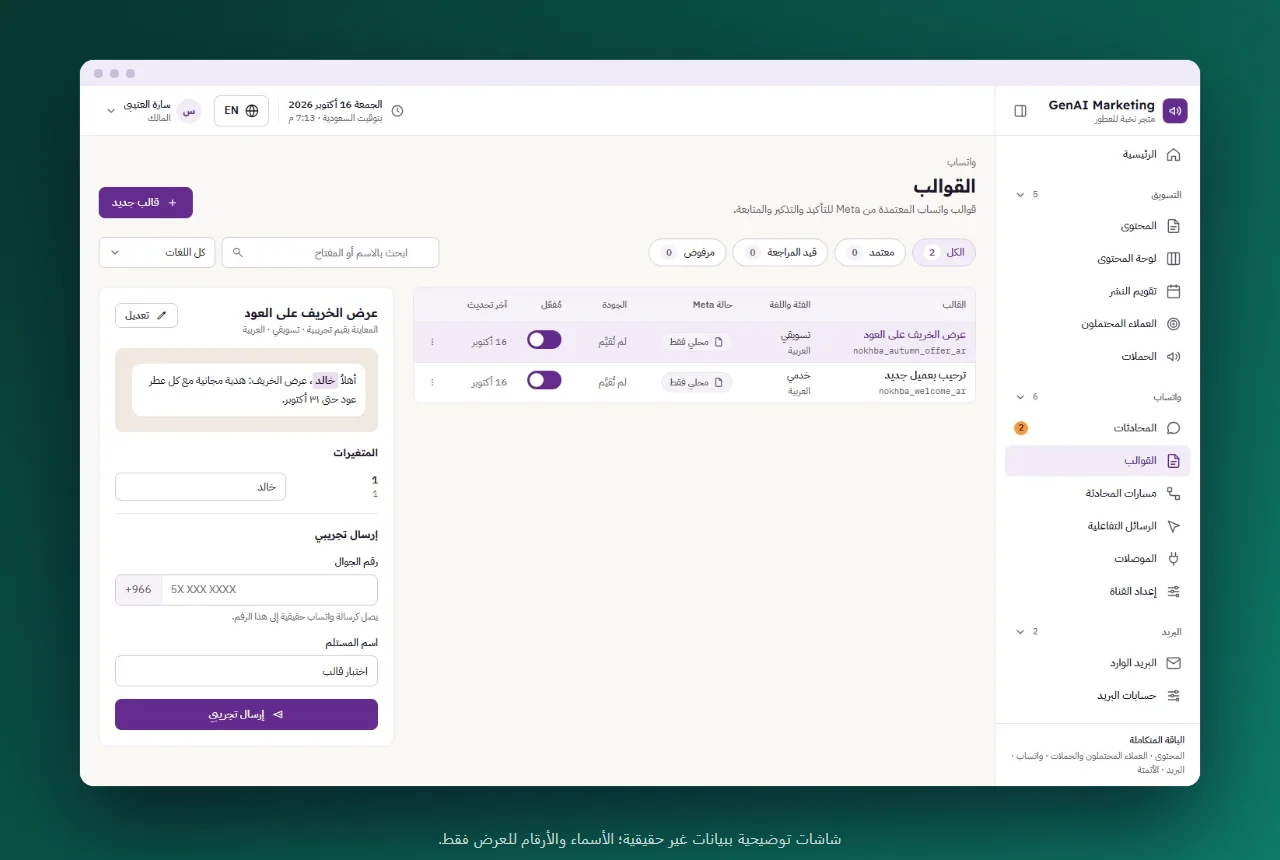
WhatsApp API by GenAI Hub is a system for your customer conversations on your company number:
One shared screen your whole team works on.
Message templates that we write and review with you in Arabic and English and send for Meta's approval.
Interactive messages with options to choose from, and workflows that carry out repeated steps.
A link to the marketing system, so a new interested person enters the list of leads.
And Nora, the AI employee in this system, replies to your customers on WhatsApp.
What you should know: template approval comes from Meta and not from us, automatic replies do not replace your team for complaints, special cases and decisions, and we do not send messages to people who have not agreed to receive them. Our team sets the system up for you and runs it with you step by step.
Frequently asked questions
What is the difference between a greeting and an away message?
The greeting reaches people who write to you for the first time, and the away message reaches people who write outside working hours. Both tell the customer when you will reply.
Do I need an approved template to reply to a customer?
On the official platform: no, if you reply within 24 hours of the customer's message. After that window closes, or if you want to start the conversation yourself, you need a template approved by Meta.
Is an automatic reply enough on its own?
No. It reassures the customer and answers repeated questions, but complaints, special cases and decisions need a person. WhatsApp's policy requires a clear way to reach one.
How long should a greeting be?
Four or five lines are enough: who you are, when you reply, what the customer should send, and a number for urgent matters if you have one.
Search keywords for your company: how do you find what your customers type into Google?
A practical way for business owners in Saudi Arabia to find the words their customers search with, and to use them on their site's pages without stuffing
Build your site yourself, or a managed site for your company? A practical comparison
A comparison for business owners in Saudi Arabia: time, content in two languages, editing after launch, and who takes responsibility when something goes wrong
A Website for Your Clinic: What Patients Look For Before They Call
A guide for clinic and medical center owners in Saudi Arabia: the pages a clinic website needs, contact from a mobile phone, and how the site stays correct after launch